---
title: IronSource LevelPlay
description: >-
IronSource LevelPlay cocos guide for Custom Adapter GMA SDK.
---
> **For AI agents:** the complete documentation index is at [llms.txt](/llms.txt). Append `.md` to any page URL for its markdown version.
## Prerequisites
*Performed by: Developer*
**App prerequisites**
* minSdkVersion of «MIN-ANDROID» (26) or higher
* iOS «MIN-IOS» (18.0) or higher — confirm with your account manager
* An ad unit must already be in place which will be used for targeting
## Install the SDK
*Performed by: Developer*
Install the TapMind LevelPlay extension:
**Extension → Extension Manager → Install from File** → select the TapMind extension ZIP → **Enable**.
Pin a tagged release ZIP rather than `archive/refs/heads/main.zip`.
## Configure your app
*Performed by: Developer*
Add your AdMob app ID to `AndroidManifest.xml`. Omitting this crashes the app on launch with `Missing application ID`.
```
```
Replace `YOUR_ADMOB_APP_ID` with your AdMob app ID from the [AdMob web interface](https://support.google.com/admob/answer/7356431). While testing, you may use Google's sample app ID shown above.
Add `GADApplicationIdentifier` to your app's `Info.plist`, plus the `SKAdNetworkItems` array for attribution.
```
GADApplicationIdentifier
YOUR_ADMOB_APP_ID
SKAdNetworkItems
SKAdNetworkIdentifier
cstr6suwn9.skadnetwork
```
Replace `YOUR_ADMOB_APP_ID` with your AdMob app ID from the [AdMob web interface](https://support.google.com/admob/answer/7356431).
Include the complete `SKAdNetworkItems` list as [published by Google](https://developers.google.com/admob/ios/3p-skadnetworks) — keep this snippet as your single source of truth so it never drifts between pages.
## Configure LevelPlay
*Performed by: Ad ops*
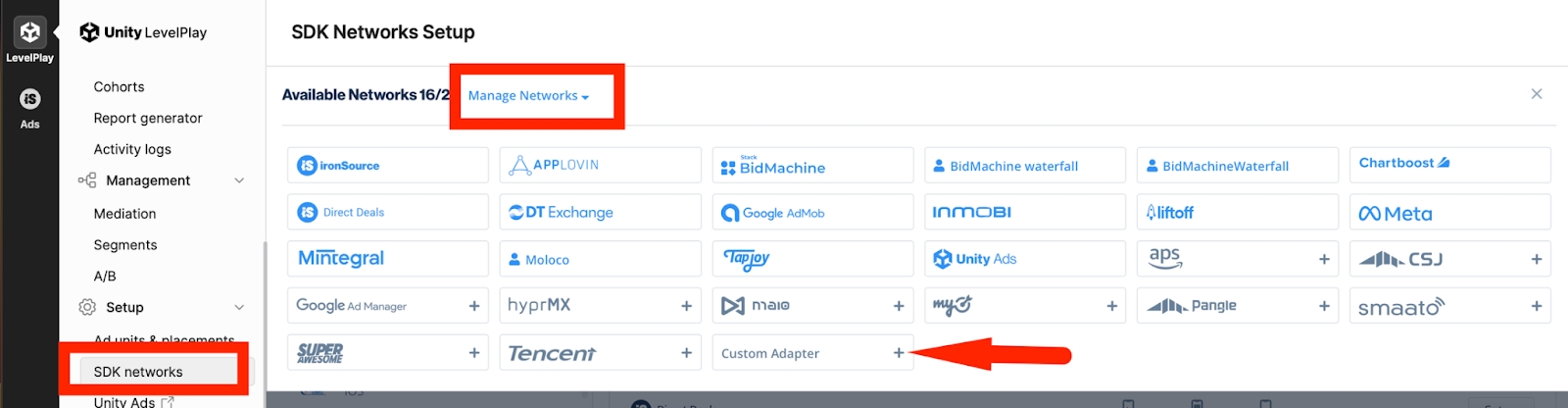
**Create the TapMind network:** Monetize → Setup → SDK Networks → Available Networks → Manage Networks → select **Custom Adapter** → enter network key **15c101cb1d** → Enter → Save. The network appears as **TapMind**.
**Set up instances:** Setup → Instances → select TapMind (Custom) → Add ad instance → select ad type →
```
Instance Name : provided by your account manager
eCPM / Rate : provided by your account manager
```
**Note:** Enter the rate for each placement — it determines waterfall order. Add one instance per ad format to start.
## Verify integration
*Performed by: Developer*
After install and dashboard configuration:
1. Run your app in a **debug** build. TapMind's test mode is enabled automatically in debug builds and serves test ads at a high fill rate.
2. Request an ad through your mediation SDK as you normally would.
3. Confirm a TapMind ad fills. Check logs for the tag **`TapMindAdapter`**.
4. When verified, build in **release** mode for production — test mode is disabled automatically in release builds, and live ads serve.
**Note:** Test mode is automatic. It follows your build type: debug = test ads, release = live ads. There is no flag to enable or disable, and nothing to turn off before going live.
## Troubleshooting
*Performed by: Developer*
| Symptom | Likely cause | Fix |
|---------|--------------|-----|
| No TapMind ad in production, but works in debug | Wrong/missing class string, or release-build stripping | Verify the class string matches the [Class & Network Key Registry](/reference/class-network-key-registry) exactly; confirm ProGuard keep-rules ship |
| No fill at all | `placementName` mismatch (case/space) or wrong eCPM position | Re-check `placementName` exactly; confirm waterfall position |
| App crashes on launch | Missing AdMob app ID in manifest/Info.plist | Add the app-ID meta-data exactly as shown in **Configure your app** |
| LevelPlay network never appears | Wrong network key | Use the canonical key from the Registry |
For anything else, contact your account manager with the log output and the tag **`TapMindAdapter`**.